For parents of athletes 13 and older

Most weeks, you're guessing.
Now you don't have to.

StrengthForge OS is the app your athlete's coach already uses. The free parent app puts you on the other end of it: how their week went, whether they're feeling ready, and a same-day alert if they report pain, so you stop hoping someone noticed.

Free for parents and athletes, always · no ads, ever · athletes 13 and older · in English, Spanish and French · Android today, iOS coming soon
What keeps parents up at night

The worries are real.
Here is what changes.

Eight things we hear from parents, and what the app actually does about each one.

"What if something hurts and nobody tells me?"
What changesWhen your athlete reports pain, a push notification goes to their coach and to you at the same time, and the report shows on your home screen.
Relieved by: Reported-pain alert
"I never really know how it's going."
What changesYour home screen shows how many workouts they did this week, when they last trained, and what's coming up. A weekly report adds the trend.
Relieved by: Parent Home and the weekly report
"Is it actually working? Is it worth it?"
What changesThe report shows your athlete's tested numbers changing over time, marked coach-verified or self-reported, so you can see growth you can believe.
Relieved by: Change over time, coach-verified
"I don't want my kid compared to everyone else."
What changesYou see your athlete's own progress against their own earlier results. No rankings, no team averages, no other athlete's data.
Relieved by: A report on your athlete alone
"Who else can see my child's information?"
What changesYour coach approves every parent link. There are no accounts for anyone under 13, and sharing beyond the app is something you choose, separately and optionally.
Relieved by: Approved links and separate consents
"Will my teen's profile go public without me knowing?"
What changesAn athlete's public recruiting profile can't be published without a parent's consent on file. Withdraw it any time and a live profile comes down right away.
Relieved by: Recruiting-profile consent
"I can't follow the fine print."
What changesEvery parent screen, including the consent and waiver, switches between English, Spanish and French at the touch of a button.
Relieved by: Three languages, everywhere
"Not one more thing to manage."
What changesThere is nothing for you to log. You read, you sign once, and you can turn off the weekly-report alert while the reports keep waiting for you in the app.
Relieved by: A viewer, not a chore
What you get

For each part of the parent app: what it is, why that matters compared with how it works today, and what it means for you.
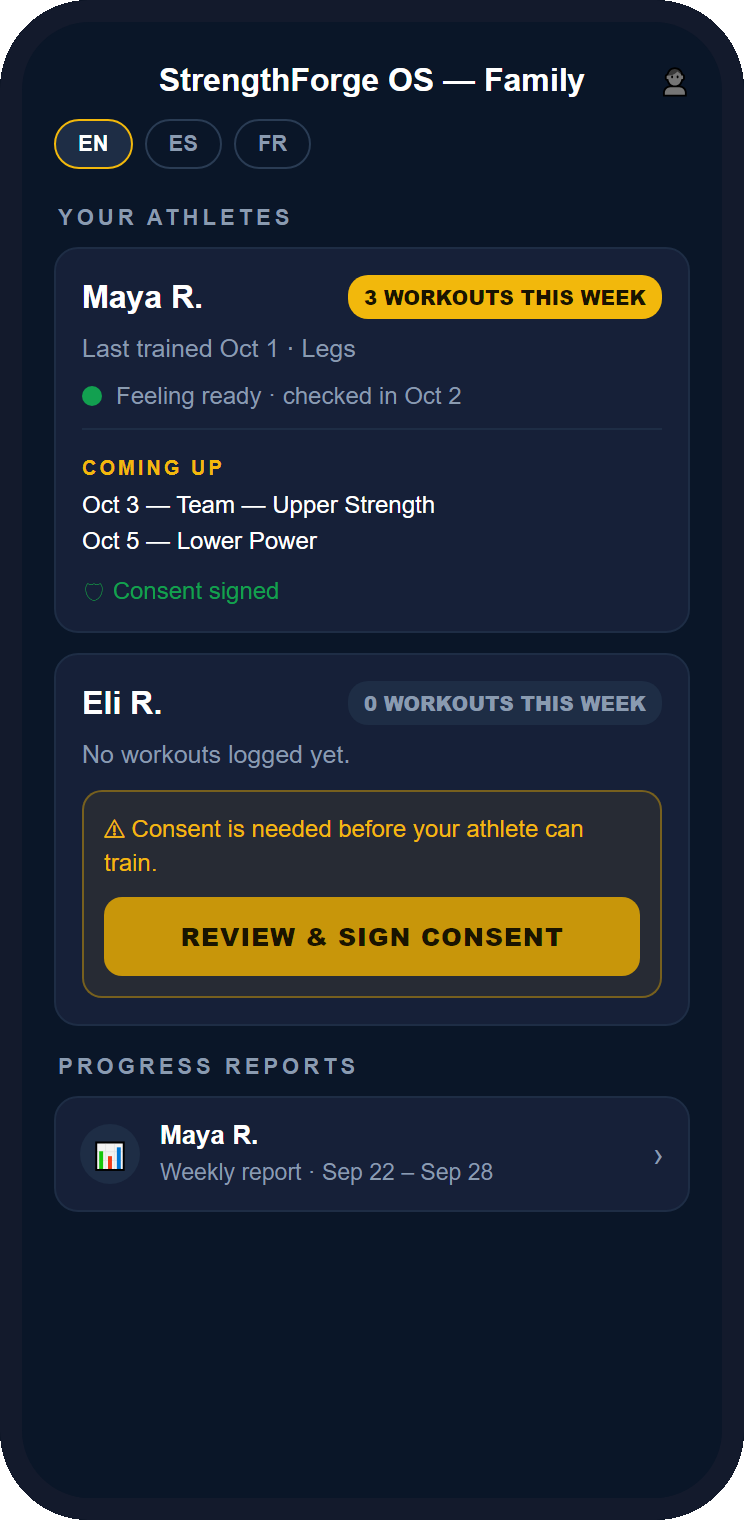
The parent home screen, showing an athlete's workouts this week, last trained, readiness, upcoming workouts, and consent status
Parent Home, shown with sample data
1Parent Home

Your athlete's week at a glance, the moment you open the app.

FEATUREADVANTAGEBENEFIT
Feature
Weekly summary for each athlete: workouts this week, when they last trained and which body part, and their next assigned workouts.
Advantage
You see the facts without asking and without waiting on a text thread.
Benefit
Conversations with your athlete start from what happened, not from nagging.
Feature
Readiness and pain on the home screen: a color from your athlete's own check-in ("Feeling ready," "Taking it easy," "Needs attention"), plus a reported-pain alert and a push notification.
Advantage
A pain report reaches you and the coach at the same moment, not days later at the next game.
Benefit
You can step in sooner, and you stop wondering whether anyone noticed.
Feature
Everything from the program in one place: coach announcements and, for clinics and events, the schedule, what's happening now, where to be, and answers to common questions.
Advantage
One app instead of scattered texts, flyers and group chats you half-read.
Benefit
You know where to be and what's planned without hunting for it.
2Weekly Progress Report

Proof your athlete is growing, on your athlete alone.

FEATUREADVANTAGEBENEFIT
Feature
A weekly report: workouts completed, their own usual pace, an eight-week trend, total volume and their training split.
Advantage
It compares your athlete only with their own earlier weeks, never with other kids.
Benefit
You can tell a rough week from a real problem, and see steady effort without leaderboard pressure.
Feature
The whole picture: practice attendance (where your program tracks it), check-ins completed, and any reported pain, with a note that the coach was told.
Advantage
Reliability and wellbeing sit next to the training numbers instead of in separate conversations.
Benefit
A fuller answer than "how was practice?"
Feature
Change over time and a note from the coach: tested numbers compared with your athlete's earlier results, each marked coach-verified or self-reported.
Advantage
You can tell which numbers a coach stands behind.
Benefit
Growth you can believe, plus a coach's own words on how the week went.
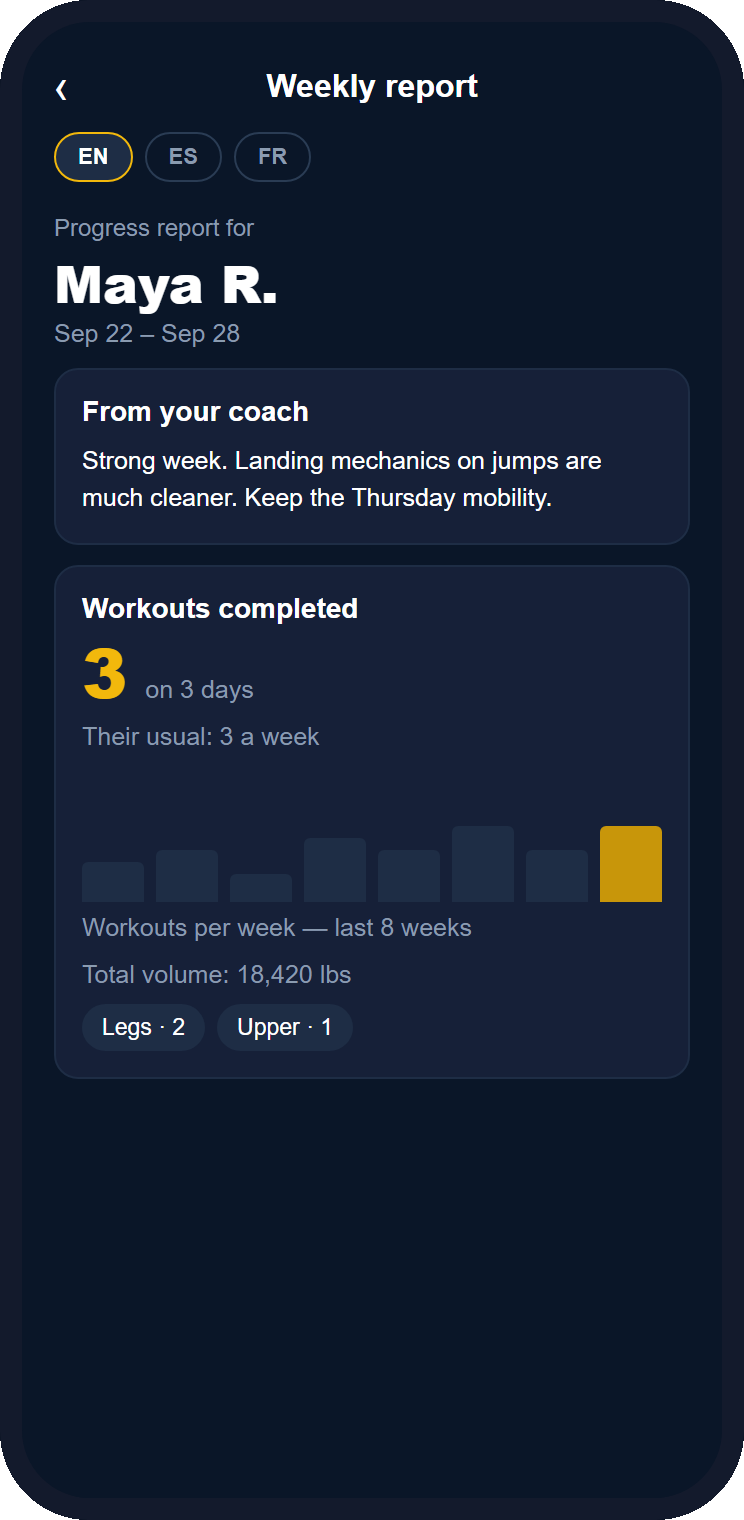
The weekly progress report, showing a coach note, workouts completed, an eight-week trend, total volume and training split
Weekly report, shown with sample data
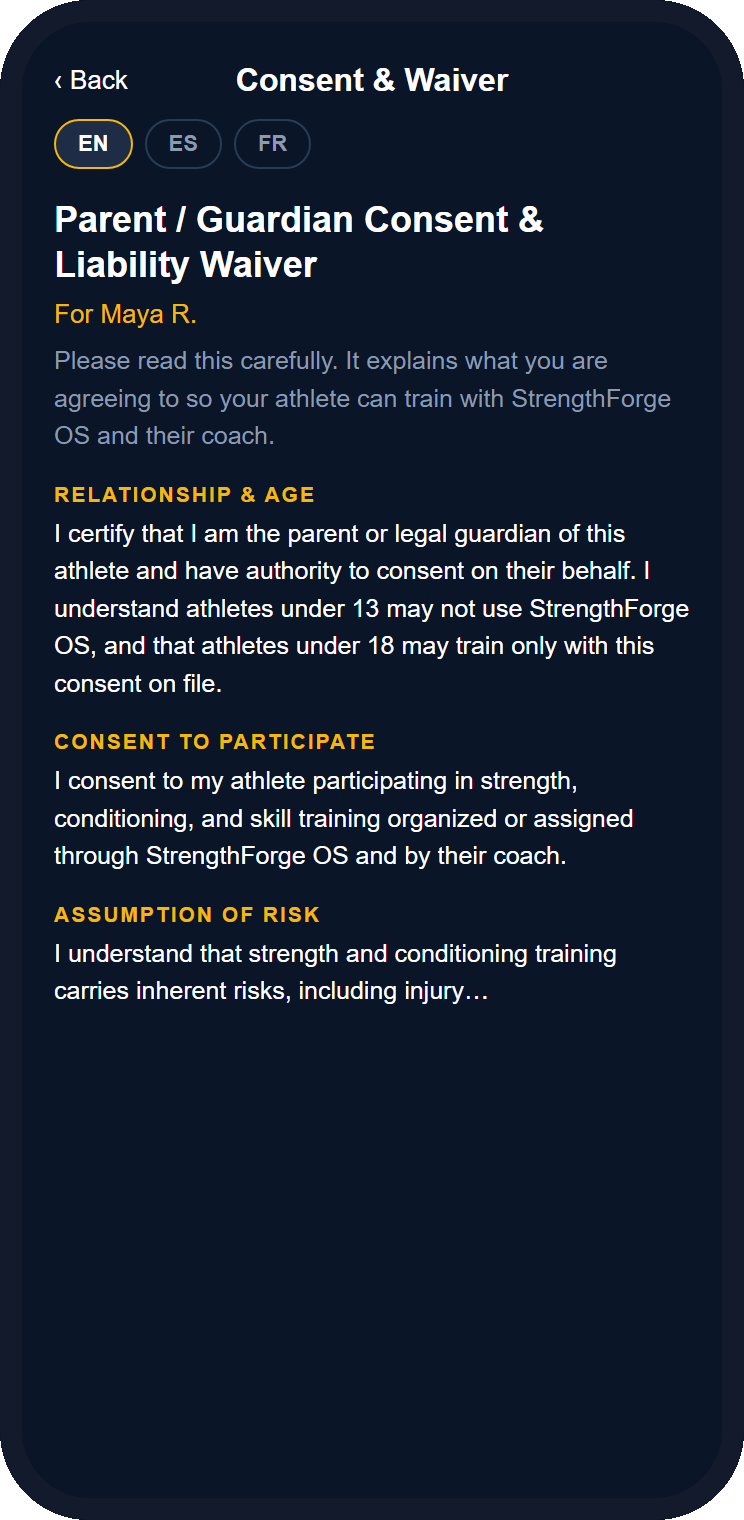
The consent and waiver screen, with a language switch for English, Spanish and French
Consent & Waiver, shown with sample data
3Consent & Waiver

You're in control of what your athlete agrees to and what leaves the app.

FEATUREADVANTAGEBENEFIT
Feature
Sign once, on your phone: your typed name is your e-signature, kept on record, and you can read the whole waiver in English, Spanish or French.
Advantage
No paper packet lost in a backpack, and you can switch language while you read.
Benefit
You understand what you're agreeing to, and there's a record that you did.
Feature
Asked again if the wording changes: when the waiver is updated, you're prompted to review and sign the new version.
Advantage
You are never held to wording you didn't see.
Benefit
Clear, current terms, and no surprises.
Feature
Separate, optional choices: anonymous research data sharing, and whether your athlete's public recruiting profile may be published. Withdrawing takes effect right away, including taking a live profile down.
Advantage
Sharing is up to a parent, off until you say yes, and never bundled with the training waiver.
Benefit
You decide what leaves the app, and you can change your mind at any time.
Getting started

Connected in about two minutes.

Your athlete's team has to be on StrengthForge OS first. If they aren't yet, the last question below tells you what to do.

1

Get your code

Your coach shares a QR code or a 6-character code. Your athlete can also make one in their own app.

2

Install and sign in

Download the app, sign in with Google (no password to remember), and choose "I'm a parent."

3

Read and sign

Enter the code, then read and sign the consent and waiver in your language.

4

See your athlete

Your athlete appears on your home screen. If your athlete made the code, the coach approves the link first.

iOS is coming soon. Athletes must be 13 or older.

Free For Parents & Kids, Always.

You never pay and your athlete never pays. Their team or program holds the license, so there is no per-family fee, ever.

No Ads Ever!

Not in the app, not on this page, not later.

Questions parents ask

Does it cost anything?

No. The parent app and the athlete app are free. The coach, club or school pays for the program license.

Can my child under 13 use it?

No. StrengthForge OS is for athletes 13 and older, and there are no accounts for anyone under 13.

Who can see my athlete's information?

Their coach, and you once the link between you is approved. You see only your own athlete: no other athletes' data, no rankings. Sharing anything beyond that, such as anonymous research statistics or a public recruiting profile, needs a separate choice from a parent.

Can I message the coach in the app?

Not today. Coaches send announcements to parents, and a reported pain alert reaches both you and the coach. There is no open chat.

What if my athlete's coach isn't using StrengthForge OS yet?

Ask them. Setup takes about twenty minutes and the first 30 days are free. You can send them this page below.

Ask your coach one question.

"Are we on StrengthForge OS yet?" If yes, you're two minutes from knowing how your athlete is really doing.

Questions? support@strengthforgeos.com